
New Malware E-Mail Tactics Pose Security Threat
We’ve all received the e-mail from the Nigerian prince who is willing to share $1M with you to help him get his money out of the country. Many spam and malware messages are obviously easy to spot but a new trend I’ve been observing is the use of familiar e-mails. The objective is to have you click on a link that will either trick you into giving personal information or install malware on your computer.
While these scams can be very difficult to spot, it isn’t impossible and I’ll show you how!
Let’s take the e-mail picture below as an example:
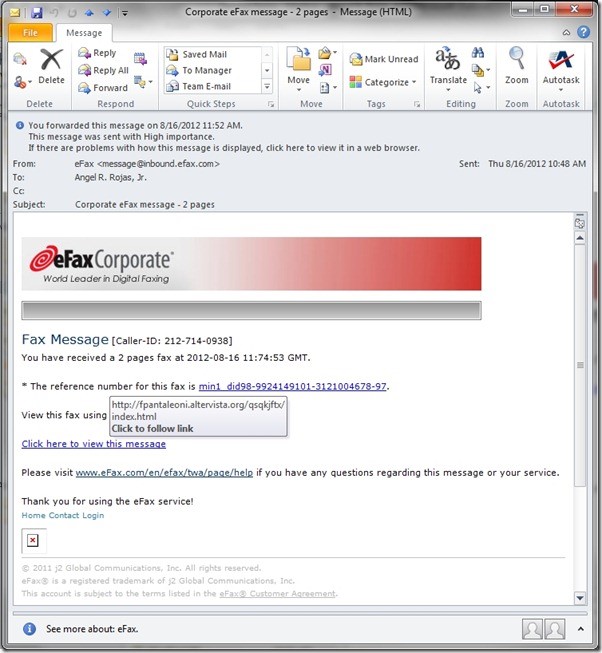
The links look legitimate and all the information seems right but there are a few clues that set this message apart.
First off, the “x” in the bottom left corner is a sign that the coding is not quite perfect on this e-mail. Companies pride themselves in their branding and will obsess over ensuring that their e-mail notifications come through perfectly every time. Considering that eFax is a sizeable company, I would have expected not to see the “x” indicating that an image was improperly inserted.
The second tell-tale sign for me: their logo wasn’t the right colors. What I mean by this, is that normally, I expect to see the following from eFax:

Additionally, I subscribe to the regular version of eFax, not the corporate edition, so I knew immediately that this could have been a problem.
On further inspection of the message, I found that I was missing an attachment. This was a more subtle hint but I’ve never had eFax offer to have me click a link to view my faxes. I have eFax set up to attach faxes to my e-mail message.
The final sign that something was definitely not right was within the links themselves. Microsoft Outlook has a great feature that allows you to “preview” where you’re going to go before you go there. By hovering your mouse over the link, you can examine what is behind it and ensure that you’re going to the site you intend to. Hovering over one of the links revealed the following:
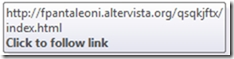
The website (URL) that the link points to is clearly not from eFax and it is a clear indication that this message is not legitimate.
In Summary, when examining e-mails, you want to ask the following questions before opening any attachments and/or following links:
- Is it from someone I know?
- Is it from a company I do business with?
- Is it formatted the way I expect?
- Are the logos correct?
- Is there anything missing that should be there?
- Is there anything extra that shouldn’t be there?
- Where are the links taking me?
By following these steps, you’ll increase your security and avoid the chance of falling prey to a cleverly designed threat!


